How to Book the PTE Exam: Documents, Steps, Payment and Rules
Understanding PTE
You have a target score and a rough month, and now you need a seat. A PTE booking reserves one PTE Academic, PTE Academic UKVI, PTE Core or PTE Home appointment at a Pearson test center, and your myPTE account holds it from the moment you pay. Pearson owns and runs PTE, so you book on pearsonpte.com, by phone through Pearson Customer Support, or through an authorized PTE partner.
Select the country where you will sit the test and the exact test product in Pearson's fee finder. Then choose an available appointment in myPTE and check the displayed total, currency and payment terms before paying. Save the confirmation and receipt. This guide does not quote a current country price.
Table of Contents
What Do You Need Before Booking the PTE Exam?
Before paying, confirm the current minimum age and parent or guardian consent process for your exact test with Pearson support. Check Pearson's identification policy for the test and country; do not infer eligibility from a rule omitted here.
- Your ID for the test, which must be physical, unexpired and issued no more than 10 years ago, usually a valid passport.
- Before booking, confirm this requirement with the official test provider or receiving authority. On test day, follow your administrator’s instructions and any approved arrangements.
Check the exact application route with the receiving authority before booking: IRCC Express Entry, Canadian PGWP requirements, Australian competent-English guidance or UK SELT guidance. Confirm accepted test version, delivery, test date and per-skill requirement. English-language evidence alone does not establish visa or immigration eligibility.
Use Pearson’s current booking guide and check the available appointments in myPTE. Confirm test product, accepted ID, appointment details and payment status. For account corrections or accommodations, contact Pearson before paying rather than rely on an unverified deadline.
Before paying, confirm the current minimum age and parent or guardian consent process for your exact test with Pearson support. Check Pearson's identification policy for the test and country; do not infer eligibility from a rule omitted here.
Can You Book PTE Without a Passport?
Sometimes: a passport is the preferred ID, but Pearson's identification policy accepts other documents for some tests and places. The ID you show on test day must be the same one you selected when you booked, and every PTE test, PTE Home included, is taken at a Pearson test center.
Use Pearson's test- and country-specific ID policy before booking. Bring the accepted document selected for your appointment, with personal details matching the booking. Check the policy’s alternative-document and UK SELT eVisa exceptions rather than assuming every candidate must use the same document.
Use Pearson's test- and country-specific ID policy before booking. Bring the accepted document selected for your appointment, with personal details matching the booking. Check the policy’s alternative-document and UK SELT eVisa exceptions rather than assuming every candidate must use the same document.
Immigrants, refugees and stateless people without an accepted ID fill in Pearson's application form before scheduling and hear back in 3-5 working days. Our guide to PTE eligibility rules covers age and ID for each test.
Where Can You Book the PTE Test Officially?
Pearson takes PTE bookings online through "Book a test" on pearsonpte.com, by phone through your local Customer Support call center, and through authorized PTE partners. All three routes end in the same appointment inside the same myPTE account. A test center counter is not one of Pearson's booking routes, so nobody can sell you a seat at the door.
An authorized PTE partner can book for you, but Pearson says a partner never needs your myPTE login and never promises a score. Pearson also flags offers far below the official fee, guaranteed scores, and score reports without a test as common signs of fraud.
The "PTE login" and "My PTE" pages lead to the account you create while booking, where your appointment and later your scores live. If you forget the password, choose "Forgotten your username or password?" on the myPTE sign-in screen for a reset link; a forgotten username needs a support form and your security questions.
Pearson has test centers in over 115 countries, and the test center data behind its test centers and fees page lists 57 test centers in India across 37 cities, including Ahmedabad, Bangalore, Chandigarh, Mumbai and New Delhi. Type your city into the booking flow and it lists the centers near you with their open dates.
Can You Book the PTE Exam for Someone Else?
Check the exact application route with the receiving authority before booking: IRCC Express Entry, Canadian PGWP requirements, Australian competent-English guidance or UK SELT guidance. Confirm accepted test version, delivery, test date and per-skill requirement. English-language evidence alone does not establish visa or immigration eligibility.
Pearson accepts a card in another name, such as a parent's, when the billing details match the cardholder. Use only a card you have clear permission to use, because a disputed payment can cancel the result.
How Do You Book the PTE Exam Online?
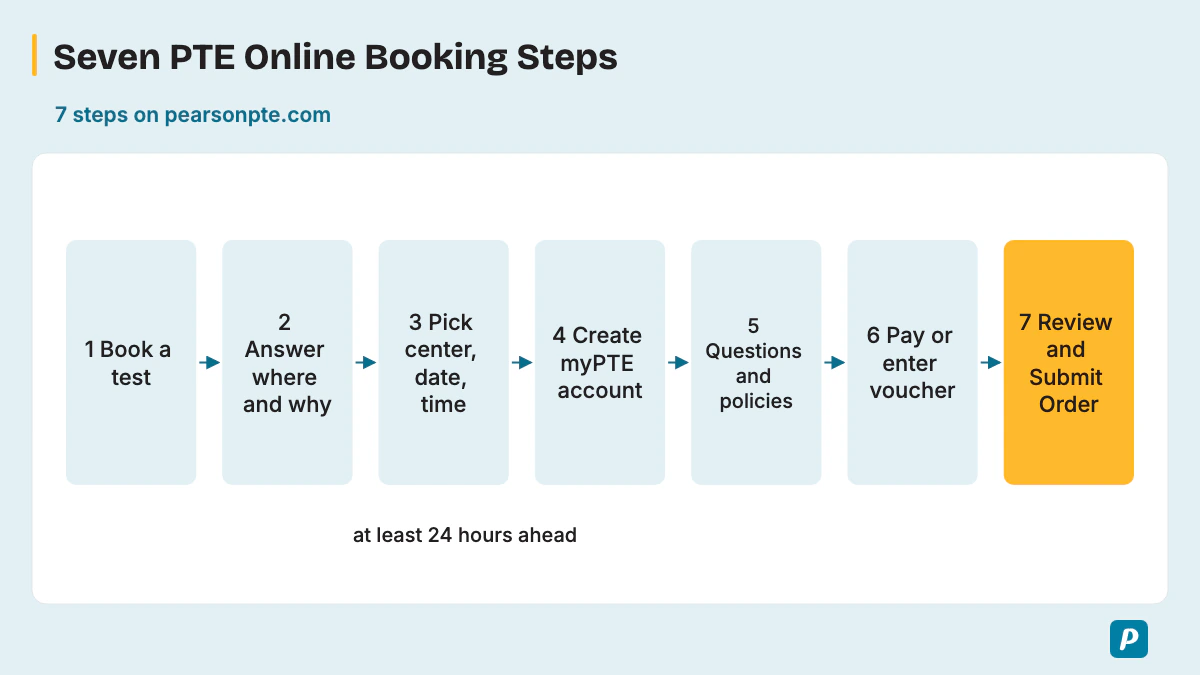
Use Pearson’s current booking guide and check the available appointments in myPTE. Confirm test product, accepted ID, appointment details and payment status. For account corrections or accommodations, contact Pearson before paying rather than rely on an unverified deadline.
- Click "Book a test" on the pearsonpte.com homepage.
- Answer "Where do you want to go" and "What do you want to do there" so Pearson recommends a test.
- Click "Check availability & book", enter where you want to test, then pick a test center, date and time and click "Book".
- Create your myPTE account with details that match your ID, then click "Create account & continue booking".
- Before booking, confirm this requirement with the official test provider or receiving authority. On test day, follow your administrator’s instructions and any approved arrangements.
- You can hold one booked test at a time and book the next only after your scores arrive.
- The retake policy allows up to 12 tests in a 12-month window, and a second account to get round it breaches Pearson's malpractice policy.
- A reschedule is free only with more than 14 full calendar days left, up to 6 times per appointment.
- Vouchers pay the test fee and never a rescheduling fee.
- You must arrive at least 30 minutes before the test, or you can't sit it and lose the fee.
- A name mismatch, such as a middle name left out of "Given names", breaks the identification policy and stops the test.
- Before booking, confirm this requirement with the official test provider or receiving authority. On test day, follow your administrator’s instructions and any approved arrangements.
- An expired passport, or one issued more than 10 years ago, fails the ID check at the center.
- Booking inside the 14-day window with unsure plans removes the free reschedule.
- Trying to pay a reschedule with a voucher fails, because vouchers cover the test fee only.
- Opening a second myPTE account blocks booking until Pearson merges the two.
- Paying in the wrong currency, or with a card that later charges back, cancels the booking.
Use Pearson’s current booking guide and check the available appointments in myPTE. Confirm test product, accepted ID, appointment details and payment status. For account corrections or accommodations, contact Pearson before paying rather than rely on an unverified deadline.
What Are Common Mistakes Students Make While Booking PTE?
Select the country where you will sit the test and the exact test product in Pearson's fee finder. Then choose an available appointment in myPTE and check the displayed total, currency and payment terms before paying. Save the confirmation and receipt. This guide does not quote a current country price.
Use Pearson’s current booking guide and check the available appointments in myPTE. Confirm test product, accepted ID, appointment details and payment status. For account corrections or accommodations, contact Pearson before paying rather than rely on an unverified deadline.
Read the booking back letter by letter on the day you pay: a missing middle name or swapped first and last names is the easiest slip to make and the cheapest to fix early.
What Happens After You Complete Your PTE Booking?
After booking, Pearson shows the appointment on your myPTE dashboard and sends a confirmation email plus a payment confirmation. From then on you manage booking changes, cancellations and any later test from myPTE.
What If You Did Not Receive a Confirmation Email?
Check your myPTE dashboard first, because Pearson shows the booking date and time there as well as in the confirmation email. Pearson says to look in junk and spam if the email hasn't arrived within two working days, and your receipt sits in myPTE under My activity > View Receipts.
There is no admit card or hall ticket to download: Pearson's booking guide and handbook end with the myPTE account details and the email, and the center checks your ID on arrival. If the booking is missing from myPTE as well, contact Pearson Customer Support before you book again.
What If Your Payment Failed but Money Was Deducted?
Open myPTE and View Receipts before you pay again, because check whether an appointment is listed and whether payment is confirmed. If nothing shows, don't retry the card several times; save the transaction reference and your bank statement for Pearson Customer Support.
Pearson's payment policy cancels any appointment whose payment is declined, cancelled or charged back, so confirm your appointment status with Pearson if checkout fails or your bank still shows a debit. Pearson refunds card payments to the original card or bank account.
Can You Reschedule Your PTE Exam After Booking?
Yes, rescheduling is free in myPTE when more than 14 full calendar days remain before the test, up to 6 times per appointment. A free reschedule needs that margin: inside 14 days the Reschedule button disappears, so you cancel and rebook. The cancellation refund is 100% beyond 14 full calendar days, 50% from 14 days until more than 7 days before the appointment, and nothing at 7 days or less (policy updated 17 September 2026). Pearson counts those days to your booked test time. If you need a test center change, check the options in myPTE or ask Customer Support while more than 14 days remain.
For illness or a family emergency, the Request Emergency Reschedule form may get you a free move at Pearson's discretion. Our guide to PTE rescheduling and cancellation rules walks through each case.
What Happens If You Miss Your PTE Exam?
A missed test brings no refund, and you book and pay again for a new date. Pearson's handbook turns away anyone who arrives late and keeps the fee, and the cancellation policy pays nothing at 7 days or less. The one way back is an emergency reschedule: send Pearson's form with evidence no later than 72 hours after the appointment, and Pearson decides at its discretion.
How Much Does a PTE Exam Cost?
Select the country where you will sit the test and the exact test product in Pearson's fee finder. Then choose an available appointment in myPTE and check the displayed total, currency and payment terms before paying. Save the confirmation and receipt. This guide does not quote a current country price.
How Many Times Can You Take the PTE Exam?
Pearson allows up to 12 tests in a 12-month window, booked one at a time. Under the retake policy you keep a single active booking, and the next test can be booked only after the scores from the last one arrive; an exception form exists if you need more attempts. See how to retake the PTE exam for the timing.
What Should You Remember Before PTE Test Day?
Use Pearson's test- and country-specific ID policy before booking. Bring the accepted document selected for your appointment, with personal details matching the booking. Check the policy’s alternative-document and UK SELT eVisa exceptions rather than assuming every candidate must use the same document.
Arrive at least 30 minutes early for check-in, where the Test Administrator checks your ID and takes a palm vein scan and your signature. Our PTE exam day dos and don'ts list covers lockers and the room rules.
How should I use this Booking guide?
Use the task guidance and authored practice examples, then check Pearson’s current instructions for your exact test. Confirm any application, fee, age or ID requirement directly with its owner before booking. Practice estimates are not official scores.
Practice PTE Online on PTE Practice
Try Speaking, Writing, Reading and Listening tasks in a timed, computer-based format.
Try speaking practice without signing up. A free account is required for full mock tests. Practice scores are estimates, not official Pearson scores.
Written by
PTE Practice Team
The team behind PTE Practice's PTE practice and mock tests
We build the PTE practice tasks, mock tests and scoring on PTE Practice, and we oversee every guide on this site. We use official test and government guidance where available, identify authored practice examples and review consequential claims before publication. PTE Practice is not affiliated with Pearson.
Editorial review completed .