
PTE Speaking Describe Image: Strategies, Templates and Examples
PTE Speaking
Describe Image puts a graph, map, table or picture on your screen, gives you 25 seconds to study it and records 40 seconds of description, once. It sits in the Speaking section of both PTE Academic and PTE Core, and Pearson scores it on Content, Pronunciation and Oral Fluency. Pearson's Academic Score Guide grades Content from 0 to 6 (Core uses 0 to 5) and stops scoring altogether when a memorized answer drops Content to 0.
Pearson's own Speaking Test Tips grade six real-style answers to one bar chart, and the gap between the best and the worst is exact figures and relationships against a list of labels. The sections below turn that into a plan for every image type.
Table of Contents
What Is Describe Image in PTE?
Describe Image is a Part 1 Speaking & Writing item that shows an image on screen and asks you to describe it aloud in your own words. The image can be a graph, chart, map, table, process diagram or picture, and you get 25 seconds to study it and 40 seconds to speak. It appears in PTE Academic and PTE Core and counts toward Speaking. It is scored for Speaking only. Your answer is recorded once and scored on Content, Pronunciation and Oral Fluency.
What Are the Describe Image Format and Timing Rules?
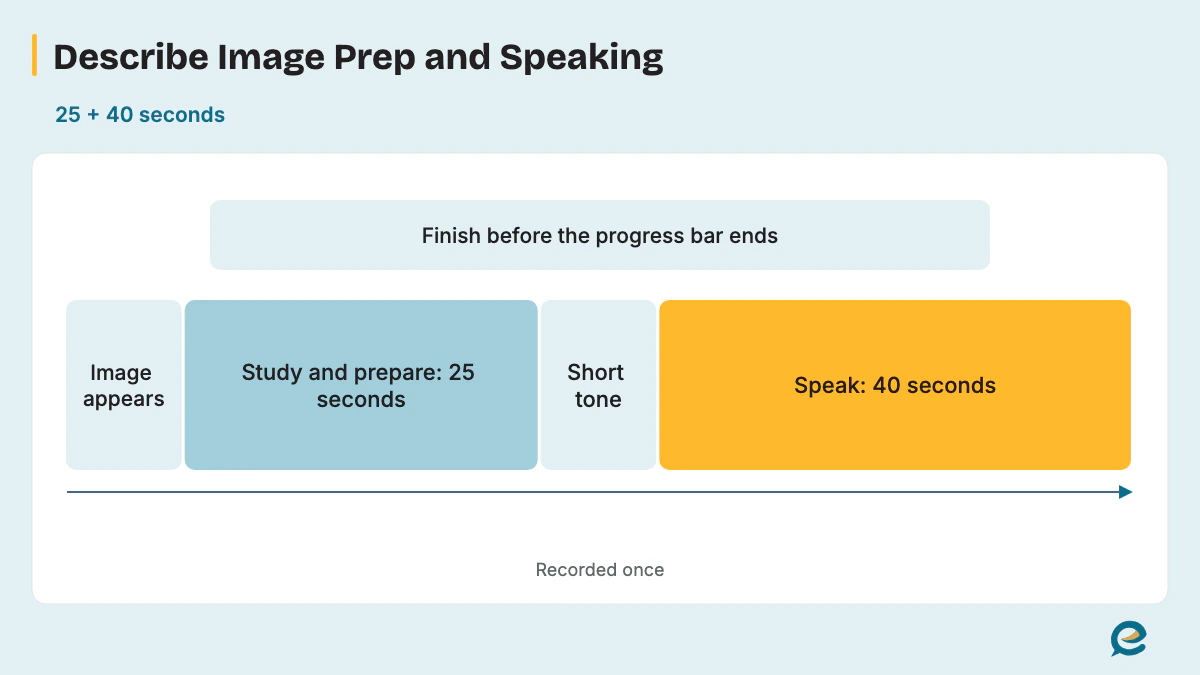
The task gives you 25 seconds to study the image, a short tone, then 40 seconds to speak, with one recording only. Each stage follows straight on from the last, as the table shows.
| Stage | What happens | Time or rule |
|---|---|---|
| Image appears | A graph, chart, map, table, diagram or picture fills the screen. | The prep countdown starts. |
| Study and prepare | You read the image and note key ideas on the erasable noteboard. | 25 seconds. |
| Short tone | The microphone opens; start speaking immediately. | Words before the tone aren't recorded. |
| Speaking | You describe the image clearly; Pearson says there's no need to rush. | 40 seconds. |
| End | Finish before the progress bar ends; "Recording" changes to "Completed". | No pause or restart. |
| Recording | The system keeps your answer. | Once only. |
Pearson's PTE Academic Test Taker Score Guide (2025) lists 5-6 questions of this type per test, and the PTE Core Score Guide (January 2026) lists 3-4 questions. Pearson's Speaking Test Tips (V6, January 2026) add that the image "will most likely be a graph, table or pie chart". The timings are the same in PTE Core.
How Is Describe Image Scored?
Pearson scores Content first, then Pronunciation and Oral Fluency, all with partial credit. In PTE Academic the Score Guide scales run 0-6 for Content and 0-5 each for Pronunciation and Oral Fluency, and a Content score of 0 means the other two traits aren't scored. The first table sets out the three traits.
| Trait | Score Guide scale | What it rewards |
|---|---|---|
| Content | 0-6 (PTE Core: 0-5) | All the main parts of the image, how they relate, and developments, conclusions or implications. |
| Pronunciation | 0-5 | Speech that most regular speakers of English understand easily, with correct word and sentence stress. |
| Oral Fluency | 0-5 | Smooth rhythm and phrasing at a constant, natural rate. |
The Score Guide's seven Content levels describe what a listener could picture from your answer.
| Content level | What the answer does |
|---|---|
| 6 | Describes the image fully and accurately, expands on the relationships, and uses varied vocabulary with precision; "A listener could build a complete mental picture of the image from the response." |
| 5 | Gets the main features right and names some relationships without much detail; the listener's picture misses only minor details. |
| 4 | Gives some accurate simple descriptions and basic relationships but may miss main features; vocabulary repeats. |
| 3 | Stays mostly superficial with minor errors and narrow vocabulary; the listener sees parts, not a whole. |
| 2 | Gives minimal descriptions with some errors and simple words; the listener pictures parts only with effort. |
| 1 | Offers "a list of points identified on the image" without description; the listener struggles. |
| 0 | Is relevant but too limited to score higher. |
Pronunciation and Oral Fluency share the 0-5 scale, and Pearson names each level.
| Level | Pronunciation | Oral Fluency |
|---|---|---|
| 5 | Highly proficient: every sound is easy to understand, with correct stress throughout. | Highly proficient: smooth rhythm, with no hesitations, repetitions or false starts. |
| 4 | Advanced: a few minor slips, but every word is easy to understand. | Advanced: no more than one hesitation, one repetition or a false start. |
| 3 | Good: most sounds are right, though a few words are unclear. | Good: acceptable speed, maybe uneven, with no long pauses. |
| 2 | Intermediate: at least two-thirds is clear, but listeners must adjust to the accent. | Intermediate: uneven or staccato, with up to one long pause. |
| 1 | Intrusive: listeners may miss about a third of the words. | Limited: irregular phrasing, many hesitations and long pauses. |
| 0 | Non-English: more than half may be hard to understand. | Disfluent: slow and labored, with most words isolated. |
The Score Guide classes pre-prepared or memorized material as an irrelevant response, which scores 0 for Content. In PTE Academic, AI scores all three traits and a human review of Content follows. If the AI and the human disagree, a second human makes the final judgment. Pronunciation and Oral Fluency stay AI-scored only. The PTE Core Score Guide uses a 0-5 Content scale with its own descriptors, and its level 0 also covers memorized material.
Pearson's Speaking Test Tips show how the Content levels sound in real answers. They grade six answers to one bar chart of dolphin and whale sightings from 2017 to 2020, from "Excellent" down to "Needs significant improvement". The two excellent answers give the exact count for each year and say how the two animals compare. The weakest answer only names the years and animals with filler around them, so Pearson explains it as a list of points without description, the wording of Content level 1.
For Academic, Content is scored 0-6 and the two delivery traits 0-5 each. Core uses Content 0-5; use its separate descriptors.
What Image Types Appear in Describe Image?
The image can be a bar graph, line graph, pie chart, table, map, process diagram or picture, and Pearson runs all of them as one task with the same timing and scoring. Pearson's Test Tips say to include the type of image in your answer, as in "This pie chart shows". Pearson's lists stop at these broad image types, so prepare for less common layouts too; each one borrows the method of a type below.
- Combination chart (bars plus a line): use the bar graph method for the bars and the line graph method for the trend.
- Flow chart or cycle: follow the arrows, as in a process diagram.
- Timetable: treat it like a table and pick the busiest or most unusual row.
- Floor plan: use the map method and place each room with location words.
- Venn diagram: say what each circle holds and what the overlap shares.
- Organization chart or timeline: move from the top or the start and give the biggest unit or the turning point.
- Labeled diagram of an object: name the object, then its main parts and how they work together.
- Two images together: describe each briefly, then link them in one sentence.
How Do You Describe a Bar Chart?
A bar chart answer starts from the tallest and shortest bars and the gap between them. The tallest bar usually carries your main point. Read the axis labels and units first, so every figure you quote means something. Our PTE bar graph page carries 12 worked bar graphs.
How Do You Describe a Line Graph?
A line graph answer follows the overall trend first, then the peak, the low point and the biggest change. One rising or falling line usually carries the main point. The PTE line graph page covers single lines, crossing lines and combination charts.
How Do You Describe a Pie Chart?
A pie chart answer names the largest and smallest shares and how they compare with the whole. Lead with the largest share. Each slice is a proportion of 100%, so "just over a quarter" works as well as an exact figure when no number is printed. See the PTE pie chart page.
How Do You Describe a Table in Describe Image?
A table answer picks the row or column that stands out instead of reading every cell. Scan the rows and columns for one standout figure and build around it, and handle timetables the same way. The PTE table chart page covers this type.
How Do You Describe a Map in Describe Image?
A map answer names what the map shows, then the main areas and where they sit relative to each other. Pearson's example image is a map of Africa, and location words such as "north of" and "along the coast" carry the answer; a floor plan works the same way. Read the PTE map describe image guide.
How Do You Describe a Process Diagram?
A process diagram answer names the start, follows the stages in order and ends with the result. The arrows set the order you speak in. Sequence words such as "first", "next" and "finally" keep the stages clear, and flow charts and cycles follow the same path. The PTE process chart page has more.
How Do You Describe a Picture in Describe Image?
A picture answer names the scene, then the main subject, then the background details and what the scene suggests. Move in one direction, from foreground to background or from left to right, so you never jump back. Use the present continuous for actions ("a woman is weighing apples") and describe only what the photo shows, never your own opinion. End with what the visible evidence suggests, such as a busy morning or a working port.
How Should You Structure a Describe Image Answer?
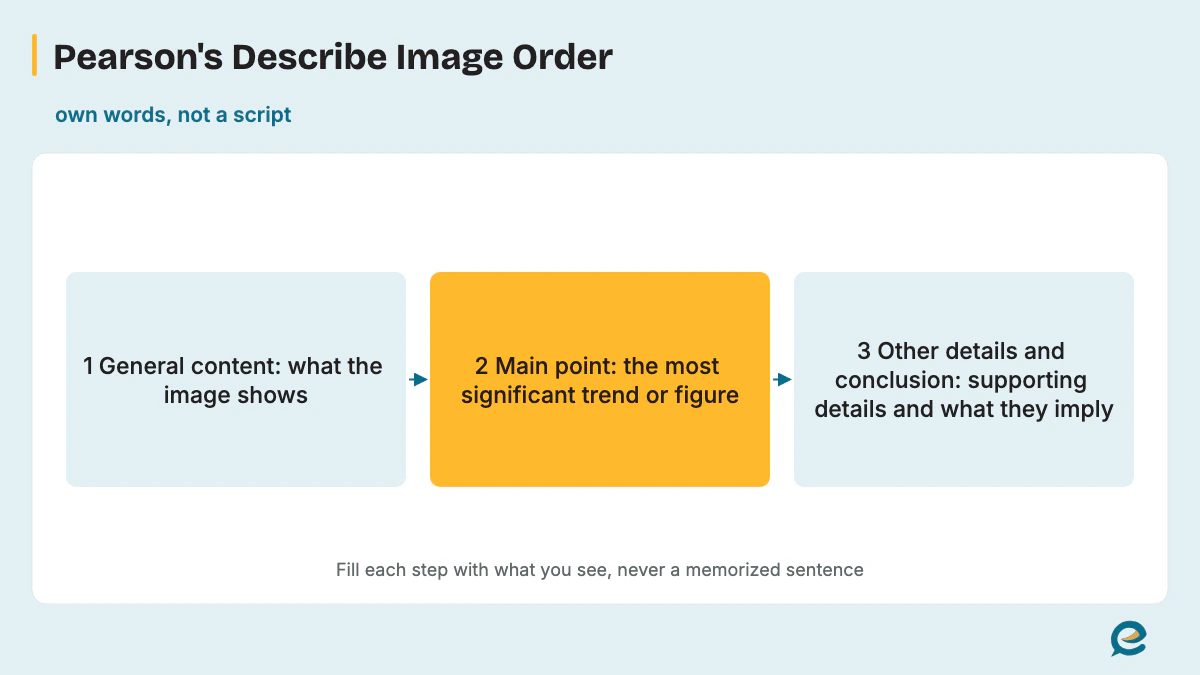
Follow Pearson's order: General content, then the Main point, then Other details and conclusion. Pearson says that if you organize what you say, you get a better score, because an organized answer covers the main information, the details and the implications. Treat it as an order of ideas, not a script.
- General content. Paraphrase the title in your own words and name the image type and what it measures, such as "This line graph tracks…".
- Main point. Give the most significant trend or feature, then two or three key features with exact numbers, comparing the highest, the lowest or the biggest change.
- Other details and conclusion. Add one supporting detail, then close with a summary, a reason the image itself shows, or a possible development the data points to.
Pearson's Speaking Test Tips (January 2026) print two layouts for one table. The first runs Introduction, Main points, Other details, Conclusion. The second runs Introduction, Key features, then Most significant feature and conclusion, so you can end on the biggest point instead of opening with it.
Use the 25 seconds to ask Pearson's two questions: what is the main idea, and what are the details? Speak for 30-40 seconds, since Pearson notes you're unlikely to cover the key features in 20 seconds or less. A practice timing split of about 5 seconds for the introduction, 20-25 for the features and 5-10 for the conclusion keeps the end in reach; it's a practice guide, not a Pearson rule.
The useful phrases below are grouped by job, so you can build fresh sentences around what you see.
| Job | Useful phrases |
|---|---|
| Introduce | "The bar chart compares…", "This photo shows…", "The diagram illustrates…" |
| Main point | "The most striking feature is…", "X leads clearly with…" |
| Compare | comparatives such as "higher than", "twice as many as", "the lowest", "slightly fewer" |
| Add | "in addition", "also", "while" |
| Contrast | "whereas", "by contrast", "on the other hand" |
| Conclude | "Overall, this suggests…", "The figures point to…" |
Is There a Template for Describe Image?
No, there's no safe fixed template: Pearson says memorized responses or templated sentences can lead to a score of 0 for Content, and then fluency and pronunciation aren't scored, so the task scores 0. Pearson's own example of a sentence to avoid is "The image is of a beautiful graph and shows various information."
Pearson's PTE Academic page gives no credit for an unoriginal response and adds, "You must use your own words." The PTE Core Score Guide puts memorized material at Content level 0 too. A flexible structure is the safe alternative: the order of ideas stays fixed, and the words come fresh from the image.
| Fill-in template | Flexible structure |
|---|---|
| The same opening and closing lines for every image, often praising the picture or saying time is up. | The same three-part order, with every sentence built from this image's title, figures and features. |
| Risks Content 0, which ends the scoring for the item. | Earns Content for the features, relationships and conclusion you actually describe. |
What Does a Describe Image Sample Answer Look Like?
A sample answer names the image, gives the main point and two or three key details, then concludes in about 30-40 seconds of speech. The ten samples below cover photos, less common images and one line graph. Each practice image is described in one line first; all are illustrative, not real data, and none is a real exam question.
Sample 1: A weekend farmers market (photo, annotated)
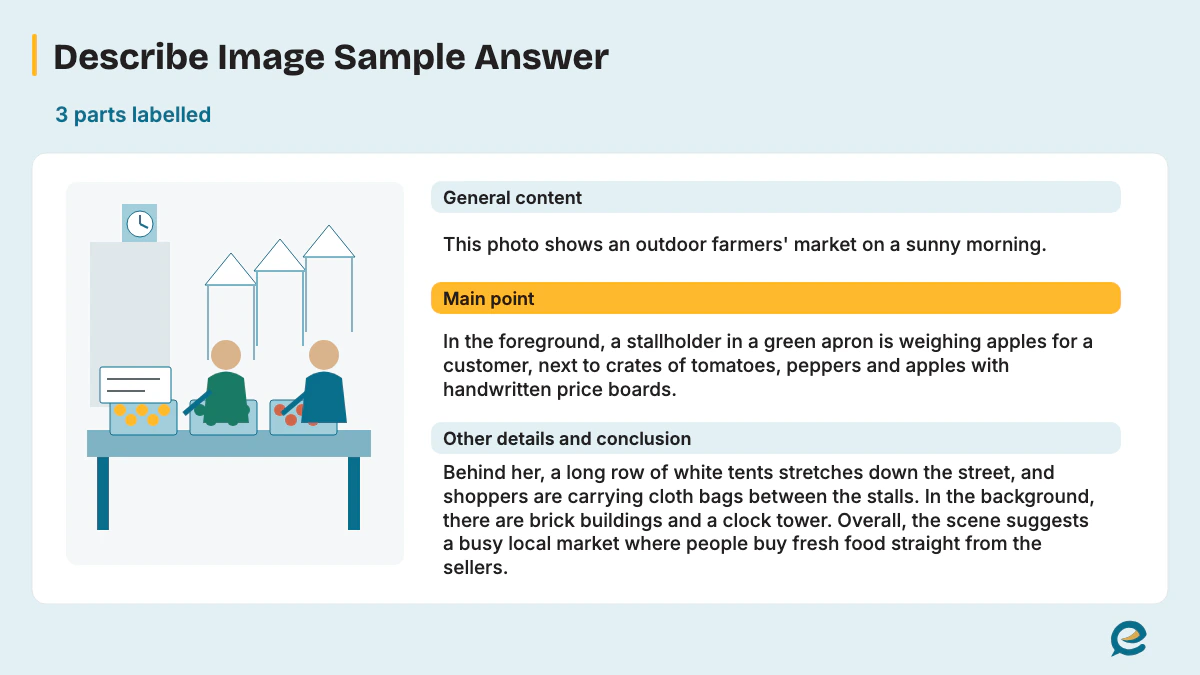
Practice image: an outdoor market on a sunny morning. In the foreground, a stallholder in a green apron weighs apples for a customer beside crates of tomatoes, peppers and apples with handwritten price boards. Behind her, a row of white tents runs down the street, and shoppers carry cloth bags. Brick buildings and a clock tower stand in the background.
[General content] This photo shows an outdoor farmers' market on a sunny morning. [Main point] In the foreground, a stallholder in a green apron is weighing apples for a customer, next to crates of tomatoes, peppers and apples with handwritten price boards.
[Other details and conclusion] Behind her, a long row of white tents stretches down the street, and shoppers are carrying cloth bags between the stalls. In the background, there are brick buildings and a clock tower. Overall, the scene suggests a busy local market where people buy fresh food straight from the sellers.
The annotated answer moves from the whole scene to the main action, then to the background, so it never jumps back. The conclusion rests on what is visible: crates, price boards and shoppers with bags. Read it aloud against a 40-second timer; if you run over, cut a detail rather than speed up.
Sample 2: Students in a chemistry lab (photo)
Practice image: four students in white coats and safety goggles stand around a bench. One pours blue liquid from a beaker into a test tube while another writes in a notebook. A teacher points at a diagram on a whiteboard, and shelves of glass bottles line the back wall.
The photo shows a school chemistry lesson with four students working around a lab bench, all wearing white coats and safety goggles.
One student is pouring a blue liquid from a beaker into a test tube, while another is recording the results in a notebook. Behind them, the teacher is pointing at a diagram on the whiteboard. Glass bottles line the back wall. Overall, the picture suggests a careful practical lesson where safety and record-keeping both matter.
Sample 3: A container port (photo)
Practice image: tall cranes lift containers onto a large cargo ship. Stacks of red, blue and gray containers fill the quay, trucks wait in a line, and a small tugboat sits beside the ship under a cloudy sky.
This photo shows a busy container port under a cloudy sky. The main feature is a large cargo ship being loaded by several tall cranes. On the quay, red, blue and gray containers are stacked high, and a line of trucks is waiting to collect or deliver more. A small tugboat is sitting beside the ship, ready to guide it out. Overall, the image suggests how goods move between road and sea through a port like this.
Sample 4: A mountain village (photo)
Practice image: houses with red roofs cover a hillside. Green terraced fields step down to a river, a narrow road winds up the slope, two farmers carry baskets along a path, and snow-capped peaks rise behind.
The picture shows a small village on a mountainside. Houses with red roofs are spread across the hillside, and below them green terraced fields step down to a river. A narrow road winds up the slope, and two farmers are carrying baskets along a path between the fields. Snow-capped peaks rise in the background. Overall, the scene suggests a farming community that has shaped steep land into fields.
Sample 5: Mammals and birds (Venn diagram)
Practice image: two overlapping circles. Mammals only: hair or fur, young fed on milk, most give birth to live young. Birds only: feathers, beaks without teeth, hard-shelled eggs. Overlap: backbone, warm-blooded, breathe with lungs.
This Venn diagram compares mammals and birds. The overlap shows three shared features: both groups have a backbone, are warm-blooded and breathe with lungs.
On the mammal side, they have hair or fur, feed their young on milk, and most give birth to live young. By contrast, birds have feathers and beaks without teeth, and they lay hard-shelled eggs. Overall, the diagram shows that the two groups share a basic body plan but differ in covering and in how they reproduce.
Sample 6: A small software company (organization chart)
Practice image: a chief executive at the top. Three managers report to her: Sales with 8 staff, Product with 15 staff and Finance with 4 staff. Product splits into Design with 5 staff and Engineering with 10.
The organization chart shows the structure of a small software company. At the top is the chief executive, and three managers report directly to her, leading Sales, Product and Finance. Product is clearly the largest department, with 15 staff, and it splits into Design with 5 people and Engineering with 10. Sales has 8 staff, while Finance is the smallest, with only 4. Overall, the chart suggests a company that puts most of its people into building its product.
Sample 7: A bakery company's history (timeline)
Practice image: a timeline from 1995 to 2025. 1995: first shop opens. 2003: second shop. 2010: online orders begin. 2018: own factory opens. 2025: 30 shops.
This timeline shows how a bakery company grew between 1995 and 2025. It began with a single shop in 1995 and opened a second one in 2003. In 2010, it started taking orders online, and in 2018 it opened its own factory. By 2025, the company had 30 shops. Overall, the bakery expanded from one shop in 1995 to 30 in 2025, adding online orders and a factory along the way.
Sample 8: Parts of a bicycle (labeled diagram)
Practice image: a side view of a bicycle. Labels mark the frame, two wheels with tires, handlebars with brake levers, the saddle, the pedals, and the chain linking the front gear to the rear wheel.
The diagram shows the main parts of a bicycle from the side. The frame joins everything together, with the saddle on top and the handlebars at the front. The handlebars carry the brake levers, so the rider steers and stops with the same hands. Below, the pedals turn the front gear, and the chain carries that movement to the rear wheel. Overall, the diagram explains how the rider's legs drive the back wheel through the chain.
Sample 9: One college's budget and students (mixed image)
Practice image: a pie chart of the college's 2025 budget, with staff salaries 55%, buildings 20%, equipment 15% and student services 10%. Beside it, a table of student numbers: 4,000 in 2023, 4,400 in 2024 and 5,000 in 2025.
The two images show one college's budget for 2025 and its student numbers from 2023 to 2025. In the pie chart, staff salaries take the largest share at 55%, followed by buildings at 20% and equipment at 15%. Student services get the smallest share, only 10%. Meanwhile, the table shows students rising from 4,000 in 2023 to 5,000 in 2025. Overall, the college is growing quickly, while the smallest share of its budget goes to student services.
Sample 10: Hotel occupancy on an island (line graph, annotated)
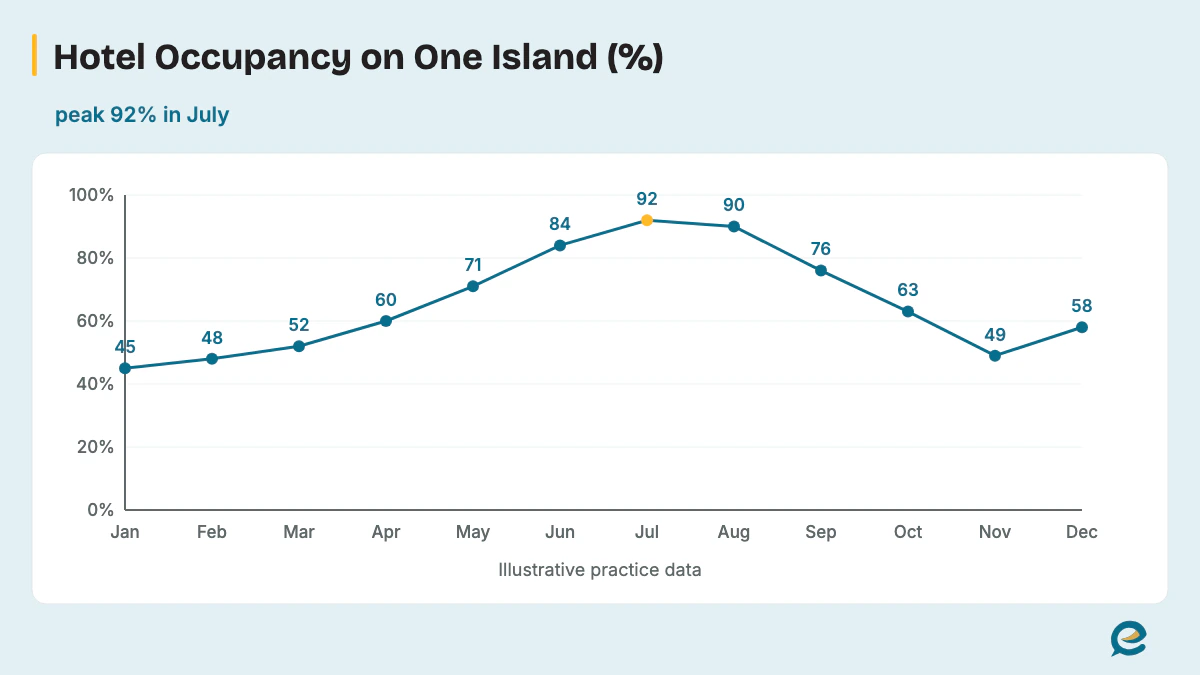
Practice image: a line graph of the share of hotel rooms filled each month on one island. January 45%, February 48%, March 52%, April 60%, May 71%, June 84%, July 92%, August 90%, September 76%, October 63%, November 49%, December 58%.
[General content] This line graph shows monthly hotel occupancy on one island over a year, as a percentage of rooms filled. [Main point] The main feature is a strong mid-year peak: occupancy climbs from 45% in January to 92% in July, the highest point of the year.
[Other details and conclusion] It stays almost as high in August, at 90%, then falls steadily to 49% in November, before a small rise to 58% in December. Overall, occupancy is highest in July and August and stays below 60% in five months of the year.
The chart answer follows the same three parts as the photo in Sample 1, but the Main point now carries two exact figures and the conclusion rests on a count you can check on the graph.
What Should You Not Do in Describe Image?
Pearson's don'ts are memorized or templated sentences, trying to mention every feature, spending too long on labels, adding your own opinion, and including inaccurate details. Each one costs a trait or the time you need for a conclusion. Nine mistakes are paired with their cost here.
- Memorized or templated sentences can drop Content to 0, which ends the scoring for the item.
- Trying to mention every feature runs out the 40 seconds before your conclusion.
- Reading every label aloud wastes seconds that the trends behind them deserve.
- Personal opinions add nothing Pearson can credit, since you only describe what the image shows.
- Inaccurate details cost Content; Pearson's example is saying 5 hours when the image says 8.
- Vague rounding wastes an exact figure; Pearson's tip is "257 minutes - not around 250 minutes".
- Starting before the tone means your first words aren't recorded.
- Fillers such as "um" and "ah", repetitions and restarting a sentence lower Oral Fluency.
- Going back to fix a missed point breaks your pace, so carry on to the next feature.
A silence of three seconds also ends the recording, as the 3-second rule section below explains.
How Do You Get Maximum Marks in Describe Image?
For maximum marks, cover the main point and the key figures in Pearson's order, use exact numbers and varied words, keep an even pace to the end, and practice every image type under real timing. A short practice loop does most of the work: one image per type, a 25-second plan, a 40-second recording, then a review against the level tables above.
Check whether a listener could build the whole picture (Content 6), whether you hesitated more than once (Oral Fluency 4), and whether every figure you said matches the image.
How Do You Manage Time in the 25-Second Prep?
Use the 25 seconds of preparation time to find the main idea and the single most significant trend, then note two or three figures to mention. Write those key ideas on the erasable noteboard as short notes, not sentences. More timing habits are on the PTE speaking tips page.
How Do You Improve Oral Fluency for Describe Image?
Oral fluency in Describe Image improves when you plan the order before the tone and then keep going without correcting yourself. The Score Guide's top level allows no hesitations, repetitions or false starts, and level 4 allows no more than one, so a planned order removes the pauses where self-correction creeps in. See our guide to oral fluency in PTE.
Does the 3-Second Rule Apply to Describe Image?
Yes, Pearson states the 3-second rule in its Answer Short Question block and adds that it also applies to Describe Image. Pearson's wording is "If you stop for three seconds whilst speaking, the recording status will change to 'completed'". The next line reads, "This also applies to speaking item types Read aloud, Repeat Sentence, Describe Image and Re-tell Lecture".
Pearson's rule ends any answer that stalls in silence. Start right after the short tone. When a word won't come, move on to the next feature; the 3-second rule in PTE speaking page has the full wording.
How Many Describe Image Questions Are in the PTE Exam?
Pearson's PTE Academic Score Guide lists 5-6 Describe Image questions, and the PTE Core Score Guide lists 3-4. That item count is per test, and neither guide says how many of them are graphs, maps, tables or pictures, so practice every type. The PTE exam format page covers Part 1 and the rest of the test layout.
Is Describe Image the Same in PTE Academic and PTE Core?
Describe Image has the same timing in both tests, 25 seconds to study and 40 to speak, and the same three traits. The Score Guides differ on item count and the Content scale. PTE Academic lists 5-6 items with Content scored 0-6, while PTE Core lists 3-4 items with Content scored 0-5 against its own descriptors. Compare the tests in PTE Academic vs PTE Core.
How Does Describe Image Fit Into PTE Speaking?
Describe Image is one of the speaking question types in Part 1, and its score feeds the Speaking skill score and the overall score. The Score Guide counts it toward Speaking only, so it doesn't add to Reading, Writing or Listening. The PTE speaking section overview shows where it sits among the other speaking tasks.
Which Describe Image Practice Questions Can You Try?
These practice prompts give you each image in one line, so you plan for 25 seconds and record your own 40-second answer before checking it against the three traits. All are illustrative and none is a real exam question.
- Photo: a railway platform at night as a train arrives, passengers with suitcases, and a digital board showing two delayed trains.
- Photo: a flooded street after a storm, with cars standing in water, people wading, and sandbags at shop doors.
- Venn diagram: solar and wind power. Both are renewable and give off no emissions while generating; solar only works in daylight, and wind turbines need open space.
- Organization chart: a hospital ward led by a head nurse, with 3 senior nurses, 12 nurses and 4 assistants.
- Timeline: a city airport that opened in 1960 with one runway, added a second terminal in 1985 and a second runway in 2005, and handled 20 million passengers in 2024.
- Labeled diagram: a desktop computer setup with a monitor, keyboard, mouse, tower and two speakers.
- Mixed image: a bar chart of a gym's members by age group beside a pie chart of its membership types.
- Flow chart: renewing a passport online, from filling in the form and uploading a photo to paying the fee, a document check, and posting the new passport.
- Timetable: buses leaving Central Station at 7:00, 7:30 and 8:00, then every hour until 18:00, with a last bus at 22:00.
- Floor plan: a two-bedroom apartment with an open-plan kitchen and living room in the center, both bedrooms on the east side, a bathroom between them, and a balcony to the south.
What If You Freeze on an Unfamiliar Image?
If an unfamiliar image appears, describe what you can see in Pearson's order: the type of image, its biggest or clearest feature, then one more detail. When a hard word on the image stops you, say it as you think it's said and keep going rather than stall. For habits that keep nerves down before and during the test, read our PTE exam anxiety guide and stay calm with a plan you've already practiced.
Practice PTE Speaking on EasyEnglish
Try Speaking tasks in a timed, computer-based format like the real test.
Try speaking practice without signing up. A free account is required for full mock tests. Practice scores are estimates, not official Pearson scores.
Written by
EasyEnglish Team
The team behind EasyEnglish's PTE practice and mock tests
EasyEnglish provides PTE practice and independent preparation guides. Official test rules are checked against the sources identified in each guide; practice examples are illustrative, not real exam questions. Practice scores are estimates. Questions or corrections: support@inverseai.com. EasyEnglish is not affiliated with or endorsed by Pearson.
Editorial review completed .